
Patriot Labs AVA Tutorials
User Interface
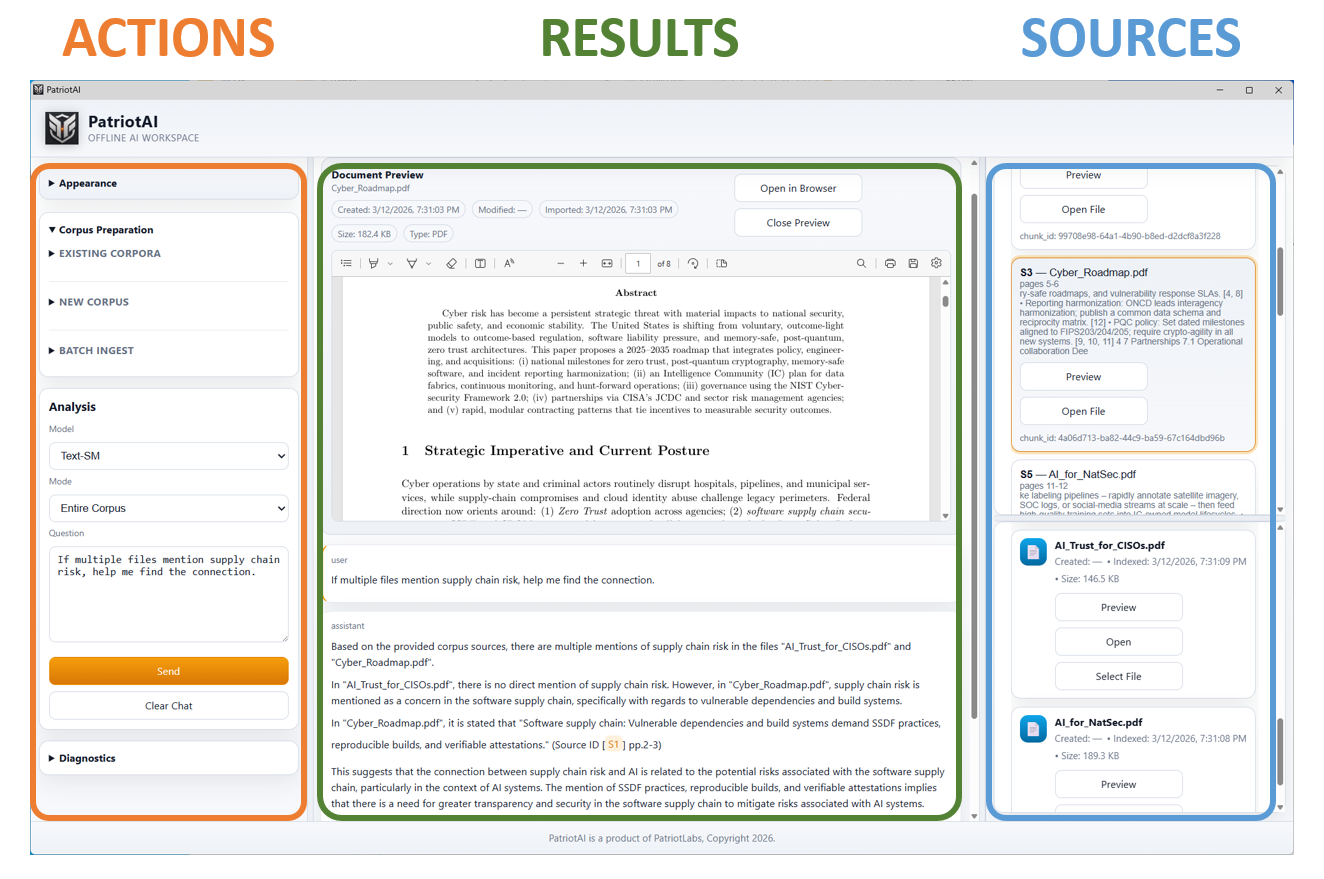
AVA has an intuitive flow of information from user ACTIONS to automated RESULTS and grounded SOURCES you can trust.
Overview
This video provides a complete overview of the AVA workspace from database selection to automated analysis. Upload a database containing nearly any file format and ask AVA questions, in plain English, about connections between the files. AVA will not only give grounded answers with references, it will also provide an overall summary of its findings.
Office/docs: pdf, docx, doc, csv, xlsx, xls, pptx, ppt, csv, tex, txt, md
Image & Video: jpg, tiff, png, mp3, ogg, wav, mp4, m4v, mov
Code: r, py, m, c, h, cpp, cc, cxx, hpp, hh, hxx
Languages: over 50 written/spoken languages with automatic translation.
Scanned File Analysis with OCR
Email Analysis
Upload an email database and ask AVA questions, in plain English, about connections between the emails. AVA will not only give grounded answers with references, it will also provide an overall summary of its findings.
Email types: .eml, msg, mbox, pst, zimbra
Languages: over 50 written/spoken languages with automatic translation.
Email Translation Analysis
AVA translates over 50 languages automatically.
Email types: .eml, msg, mbox, pst, zimbra
Languages: over 50 written/spoken languages with automatic translation.
Oil & Gas Database
In this demo we are going to look at a Oil & Gas database to search for maintenance records using AVA , our secure AI agent.
Medical Database
In this demo we are going to look at a Medical Clinic database to search for patient related issues using AVA, our secure AI agent. *Please note that the patient information has been changed for this demo.
Accounting Database
In this demo we are going to look at an Accounting database to search for operational costs and issues using AVA, our secure AI agent.
Related File Analysis
In this demo we are going to look at a comparative analysis of 5 related files: a "Master Services Agreement" between the City of San Antonio and a contractor, a "Statement of Work", a scanned "Security Exception Memo", an "Invoice and Acceptance Packet" and a email thread that discusses the "Change Order".
Plotting Tools
We have already looked at several ways to ask AVA to evaluate files. Now let's look at a few ways that we can plot data contained in our datasets.
Evidence Graph & Audit
AVA can build an Evidence Graph that shows how events, records, people, actions, and findings are connected. Instead of reviewing information as isolated documents, AVA helps reveal relationships across the evidence. This is useful for software analysis, business records, investigations, and legal evidence review, where understanding the chain of events can be just as important as the individual facts.
A key part of AVA’s Grounded AI design is the ability to download audit files. These files capture the settings, sources, model behavior, and chain of events behind a response. If a result supports an important legal, business, or technical finding, the audit file helps reproduce how that answer was created. If a response looks questionable, the audit file gives us the information needed to debug, improve, and verify the result.
Legal Database
In this demo we are going to look at a Legal database to search for law firm and issues using AVA, our secure AI agent.